Tasks
How a single agent run is queued, runs, stops, and retries.
Every time an agent starts working, Multica creates a task. It records what triggered the run, which agent it went to, how far it has progressed, and whether it ultimately succeeded.
Issues and tasks
An issue holds the goal, discussion, assignee, and final status of a piece of work; a task records one agent run against that work.
| Issue | Task | |
|---|---|---|
| What it records | A piece of work moving forward | One agent run |
| How long it lasts | Can be discussed, amended, and reassigned repeatedly | From trigger until completion, failure, or cancellation |
| Cardinality | One issue can span many runs | Every run gets its own record |
So the same issue can be handed to different agents in turn, or run again after a failure. Each run produces a new task; earlier records are never overwritten.
Trigger sources
Any of the following can trigger a run:
- Assigning an issue to an agent or a squad.
- Mentioning an agent in a comment.
- Sending a message to an agent in chat.
- An Autopilot firing on a schedule or from an external event.
Different entry points provide different context, but execution works the same way: Multica creates a task, a runtime claims it, and the runtime invokes the AI coding tool the agent is configured with.
Execution lifecycle
A task typically moves through these states:
| State | Meaning |
|---|---|
deferred | Scheduled to fire later; enters the queue at the appointed time |
queued | Waiting for a runtime to claim it |
dispatched | A runtime has claimed it and is starting the AI coding tool |
waiting_local_directory | The target local directory is held by another run; waiting for the directory lock to release |
running | The AI coding tool is executing |
completed | The run finished normally |
failed | The run errored or was interrupted |
cancelled | The run was stopped manually |
When the runtime is online, a new task usually starts quickly; if the runtime goes offline after the task enters the queue, the task stays queued until it recovers. A task left unclaimed for more than 2 hours ends as failed.
If the system already knows the target runtime is offline before triggering, some immediate actions report that the run cannot start right now instead of creating a task nothing can claim.
A runtime with a healthy heartbeat can execute long tasks; the server never force-ends a run just because it has been running for a while. The runtime decides whether the process has stalled based on actual activity; see Environment variables for the relevant settings.
Viewing run history
Open an issue and go to the Execution log to see every task it has produced. Each row shows the trigger source, the executing agent, the state, and timing.
From here you can:
- Open a run record to see the agent's messages, tool calls, and error output.
- Stop tasks that are deferred, queued, starting, waiting for a local directory, or running.
- Retry a failed or cancelled task.
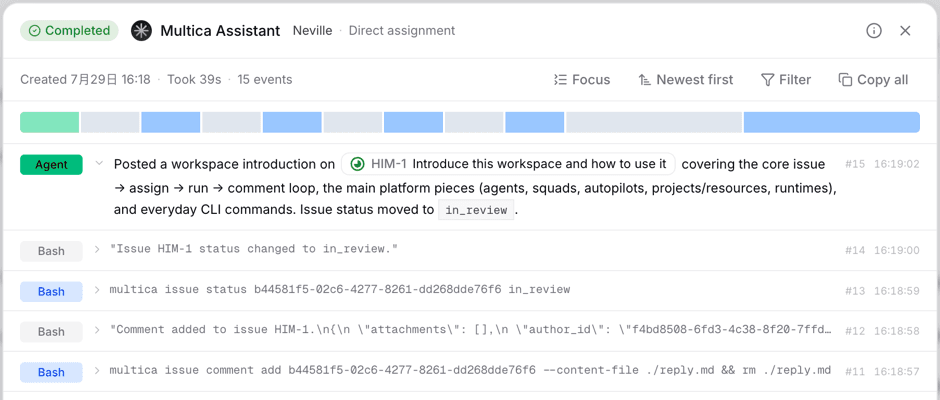
Changing an issue's assignee or status does not stop a run that has already started. To interrupt one, stop the corresponding task in the execution log. Active tasks are cancelled along with an issue only when the issue is deleted.
Failures and automatic retries
Transient faults — a runtime going briefly offline, a daemon restart, an execution timeout, or a network interruption in the AI coding tool — can trigger an automatic retry. A regular task runs at most twice by default; tool network interruptions get up to three attempts.
Errors returned by the agent itself are usually not retried automatically. Expired credentials, exhausted quota, misconfiguration, or a model unable to complete the request all need the cause fixed first, followed by a manual retry.
An Autopilot's run only mode does not retry automatically, to avoid overlapping with the next scheduled run. The create issue mode produces regular issue tasks, so infrastructure failures still retry under the rules above. Both modes show their final result in the Autopilot run history.
When an issue has no other active task and no new retry waiting to run, a failure moves an in_progress issue back to todo.
Failure reason reference
The failure reasons shown in the execution log and usage stats fall into two groups: unprefixed reason codes are recorded by the platform; agent_error.* codes are classified from the AI coding tool's own errors.
Platform side
| Reason | Meaning | What to do |
|---|---|---|
runtime_offline | The runtime went offline during the run | Restore the runtime and retry; see Daemon and runtimes |
queued_expired | Queued for over 2 hours with no runtime claiming it | Confirm the runtime is online, then retry |
runtime_recovery | The daemon reclaimed an interrupted run after restarting | Retry directly |
cancelled | Stopped manually, or cancelled along with an archive or delete | Nothing to do |
timeout | Exceeded the daemon's configured execution time limit | Narrow the issue scope, or adjust the daemon's agent_timeout |
iteration_limit | Hit the iteration cap for a run | Narrow the issue scope |
agent_blocked | The agent reported it cannot proceed | Provide what its comment asked for |
api_invalid_request | The platform API rejected an invalid request | Retry; report the problem if it recurs |
codex_semantic_inactivity | Codex produced no meaningful output for too long and was judged stalled | Retry, or adjust the Codex inactivity timeout |
Tool side (agent_error.*, prefix omitted)
| Reason | Meaning | What to do |
|---|---|---|
provider_auth_or_access | Model provider authentication failed or access denied (401/403) | Sign in again in that AI coding tool, or check the API key |
provider_quota_limit | Quota or balance exhausted (402) | Top up or switch accounts |
provider_capacity_or_rate_limit | Rate limited or out of capacity (429/529) | Retry later |
provider_server_error | Model provider server error (5xx) | Retry later |
provider_network | Network failure reaching the model provider | Retries automatically; check the executing machine's network if it persists |
model_not_found_or_unavailable | The model does not exist or is currently unavailable | Pick an available model in the agent settings |
context_overflow | Context exceeded the model window | Narrow the issue scope or reduce the input |
missing_config | Required configuration such as an API key is missing | Fill in the agent's environment variables or the tool configuration |
runtime_missing_executable | The AI coding tool's executable was not found | Reinstall the tool; see Install AI coding tools |
runtime_version_unsupported | The AI coding tool version is too old | Upgrade the tool |
process_failure | The tool process exited abnormally | Check the run record to locate the cause, then retry |
empty_or_unparseable_output | The tool produced no output, or output that could not be parsed | Retry; check the tool installation if it recurs |
agent_timeout | The tool was terminated after going unresponsive for too long | Retry or narrow the issue scope |
unknown | Unclassified failure | Check the raw error in the run record |
Manual retry
Clicking the retry button on a row in the execution log invokes the agent that ran that task at the time. Even if the issue has since been reassigned, the retry does not switch to the new assignee.
A retry keeps the files the previous run already wrote to the local directory whenever possible. If the original session is still safe and the same runtime claims the retry, it also continues the previous session. Errors that poison the session, such as context overflow or invalid requests, start a new session on top of the original working directory instead. When the original directory no longer exists, a fresh working directory is used.
You can also rerun the current issue from the CLI:
multica issue rerun <issue-id>This form does not point at a specific past task, so it uses the issue's current agent assignee and starts with a fresh session and working directory.
Task completion and issue completion
completed only means this particular run ended normally — it does not confirm the issue's goal has been met. You can still review the result, keep discussing, add requirements, or trigger the agent again.
Whether an issue is done is judged by the actual progress of the work and the issue's status.
State and timeout quick reference
The numbers below reflect the server's default configuration, for quick cross-checking while troubleshooting.
| State | Meaning | Timeout and consequence |
|---|---|---|
deferred | Scheduled to fire later | Enters queued at the scheduled time, then the rules below apply |
queued | Waiting for a runtime to claim it | Fails after 2 hours unclaimed; not retried automatically |
dispatched | Claimed; the tool is starting | Treated as failed after more than 5 minutes in this state |
waiting_local_directory | Waiting for the local directory lock to release | No timeout of its own; returns to the startup flow once the directory is released |
running | The AI coding tool is executing | No fixed duration cap; liveness follows the runtime heartbeat — one every 15 seconds; a runtime that loses its heartbeat is marked offline within about 3 minutes at the latest, and its tasks fail with it |
Automatic retry covers only the transient faults below, and only applies to tasks attached to an issue or a chat (excluding the Autopilot run only mode):
| Auto-retryable failure reason | Attempt ceiling |
|---|---|
| Runtime offline | 2 by default (first run + 1 retry) |
| Reclaimed after a daemon restart | 2 by default |
| Platform-judged execution timeout | 2 by default |
| Codex stalled with no meaningful output | 2 by default |
| Skill bundle download failure | 2 by default (the agent process has not started at this point; already-downloaded bundles come from the local cache) |
| Tool network interruption | Up to 3; the final attempt starts after a delay of about 5 seconds |
All other failure reasons (auth, quota, configuration, model, and so on) never retry automatically; fix the cause first, then retry manually.
Next steps
- Daemon and runtimes — which computer a task executes on.
- Assigning issues to agents — trigger a run from an issue.
- Mentioning agents — add requirements in comments or bring in other agents.